Multi-Package Orders
Target customers were confused when a single order arrived in multiple packages, leading to uncertainty around delivery status. The experience lacked clear indicators, and messaging was easy to miss.
As order complexity continues to grow, with Target shipping products from multiple sellers, it's essential for clarity to come through.
March - April 2025
Target
In Production
Research
UIUX Design
User Flow
Wireframing
Background
While performing my engineering duties, I lead UX design initiatives to solve for confusion around multiple package orders.
Utilizing my front-end engineering background, I approached this work with a strong understanding of existing systems, UI patterns, and technical constraints—focusing on solutions that were not only clear for guests, but also feasible to ship within the current platform.
Goal
Make multi-package orders immediately understandable across the app.
Impact
Reduced confusion around split shipments.
Improved clarity of delivery status across packages on desktop & mobile
Shipped to production
The Problem: Unclear Orders, Frustrated Guests
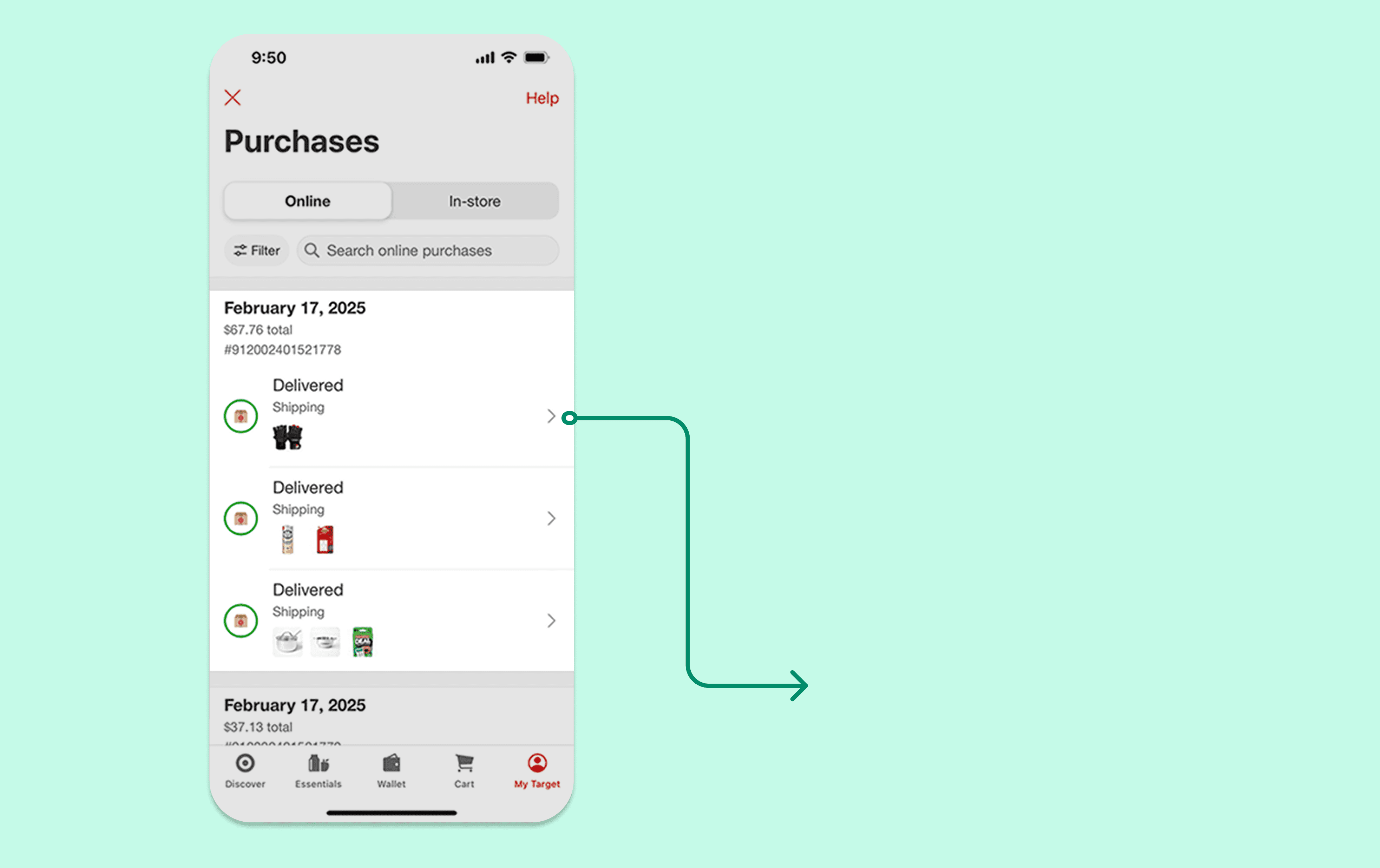
Users saw 3 items on the order history page but didn’t think they were part of the same order

Package info buried in long order details page
How might we help users quickly understand when an order contains multiple packages, so they can feel secure and prevent unnecessary customer support requests?

Skip to solution click here!
Ideal Scenario
I storyboarded a happy path scenario, in which the guest opens the app and immediately understands that their order was intentionally split into multiple packages. They can clearly see that each package has its own delivery status and that the rest of their items are still on the way. The primary goal is reassurance by surfacing the right information earlier and more clearly.

Competitive Analysis
As part of my research, I looked at how other platforms handled multi-package orders.
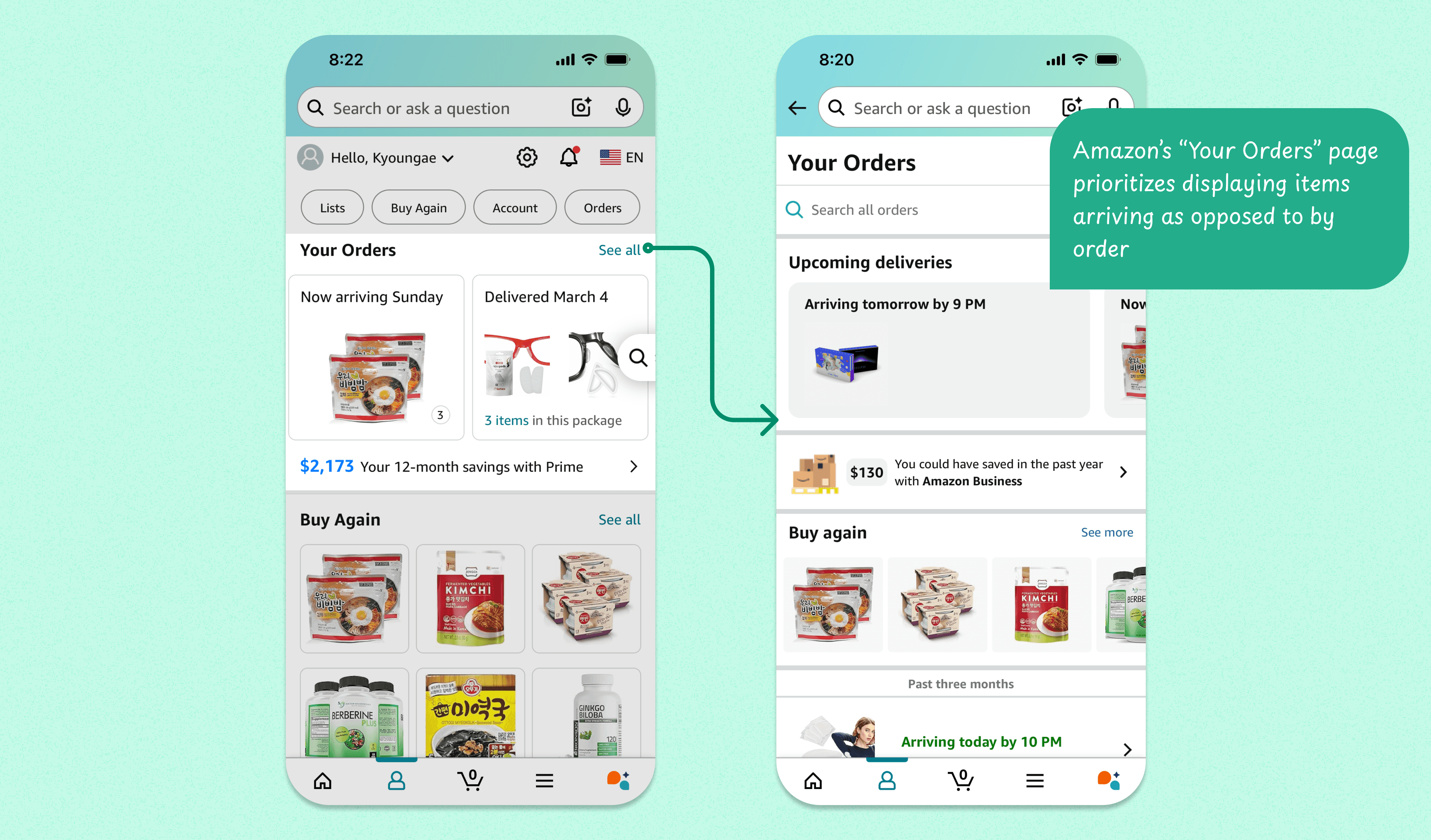
Amazon: prioritizes showcasing items by delivery date rather than by order
Walmart: user's felt similar confusion as Target customers regarding order status
It became clear that a simple but effective visual cue could go a long way in rebuilding trust.
Hypothesis: By adding a visual cue to indicate that an order contains multiple packages, users can easily understand that they have multiple packages arriving.

Idea 1: Package Summary
The first concept explored summarizing package progress using numeric indicators such as “1 of 3 delivered.” This approach conflicted with existing UI patterns, as numeric badges were already reserved for cart and notification counts.
Having worked closely with existing UI systems, I quickly recognized that reusing numeric badges would introduce inconsistency and new confusion across the app.

Learnings: Good design isn’t just about adding clarity — it’s also about respecting established patterns.

Idea 2: Labeling the packages
Another direction involved explicitly labeling each package using either text-based labels or badge-based indicators. While these approaches made packages more distinct, this solution would require re-architecturing Target's order-shipping system. After talking with the team, it was determined package labels were out of scope for this project.

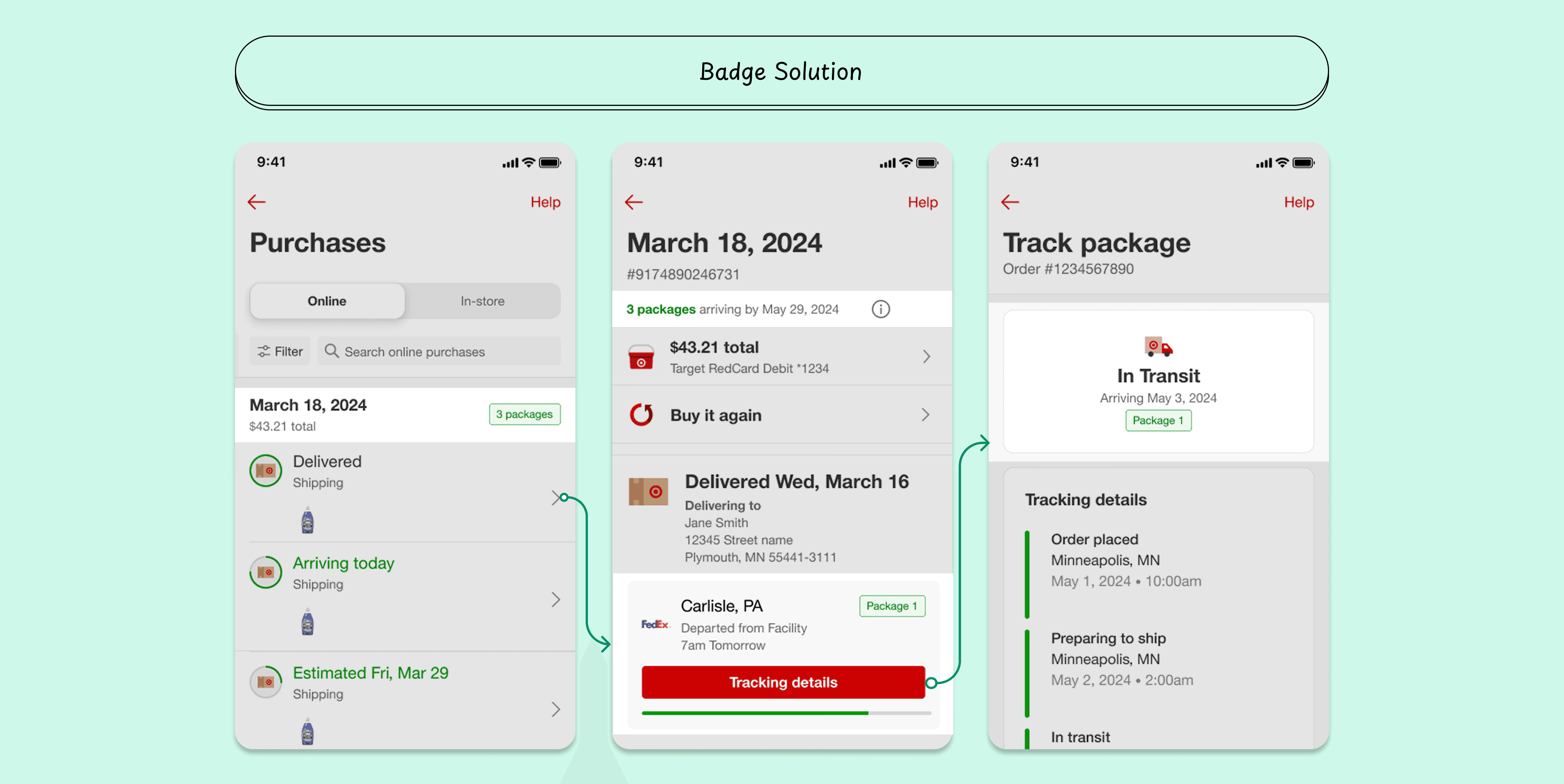
Idea 3: Package Count & Status in Header
A third concept explored surfacing the total package count in the order header. Although early feedback was positive, this direction was abandoned after learning that the header component was scheduled to be deprecated, making the solution unsustainable.

User Testing
After initial explorations and critique sessions, I iterated on my designs to land on a solution:
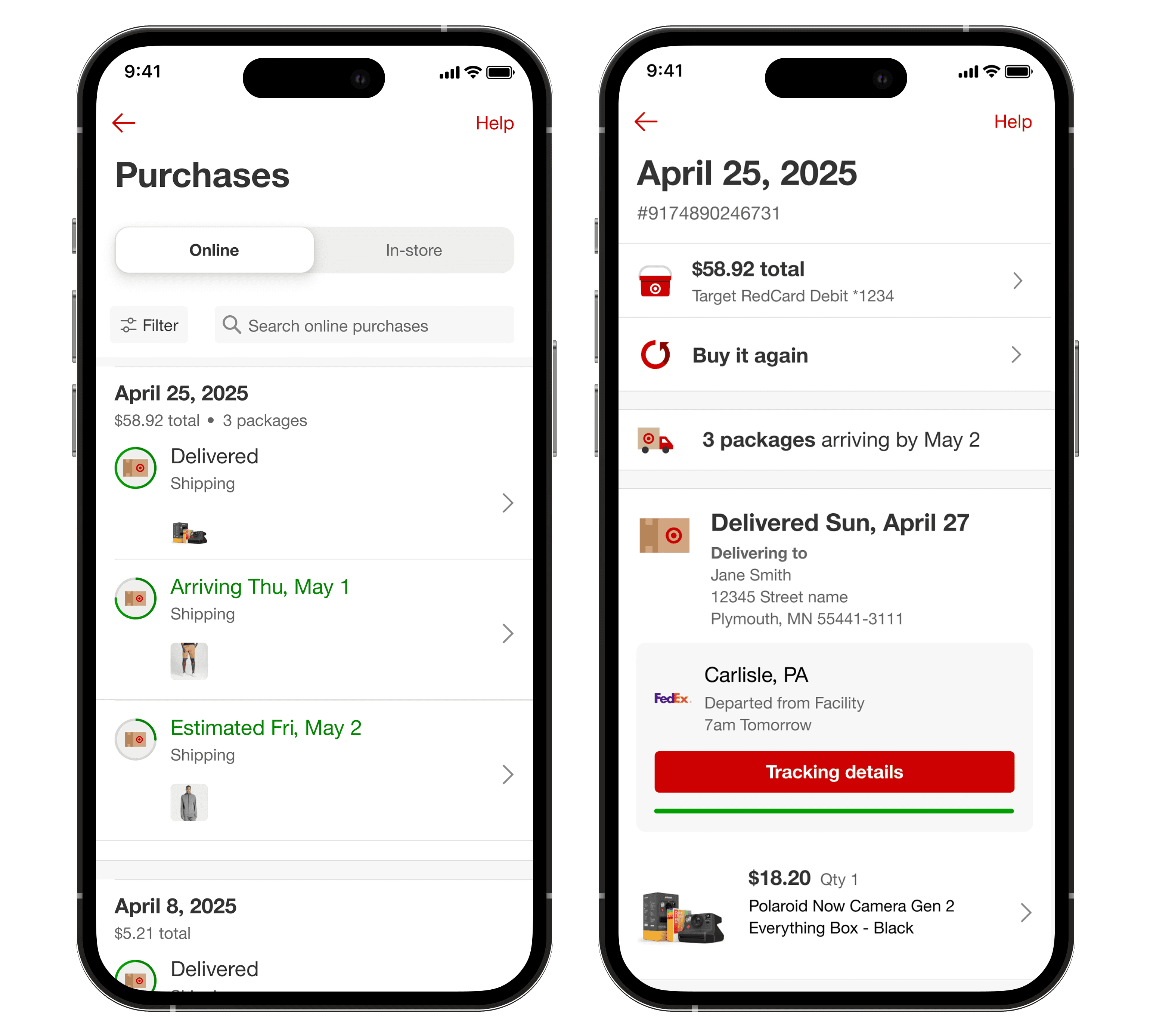
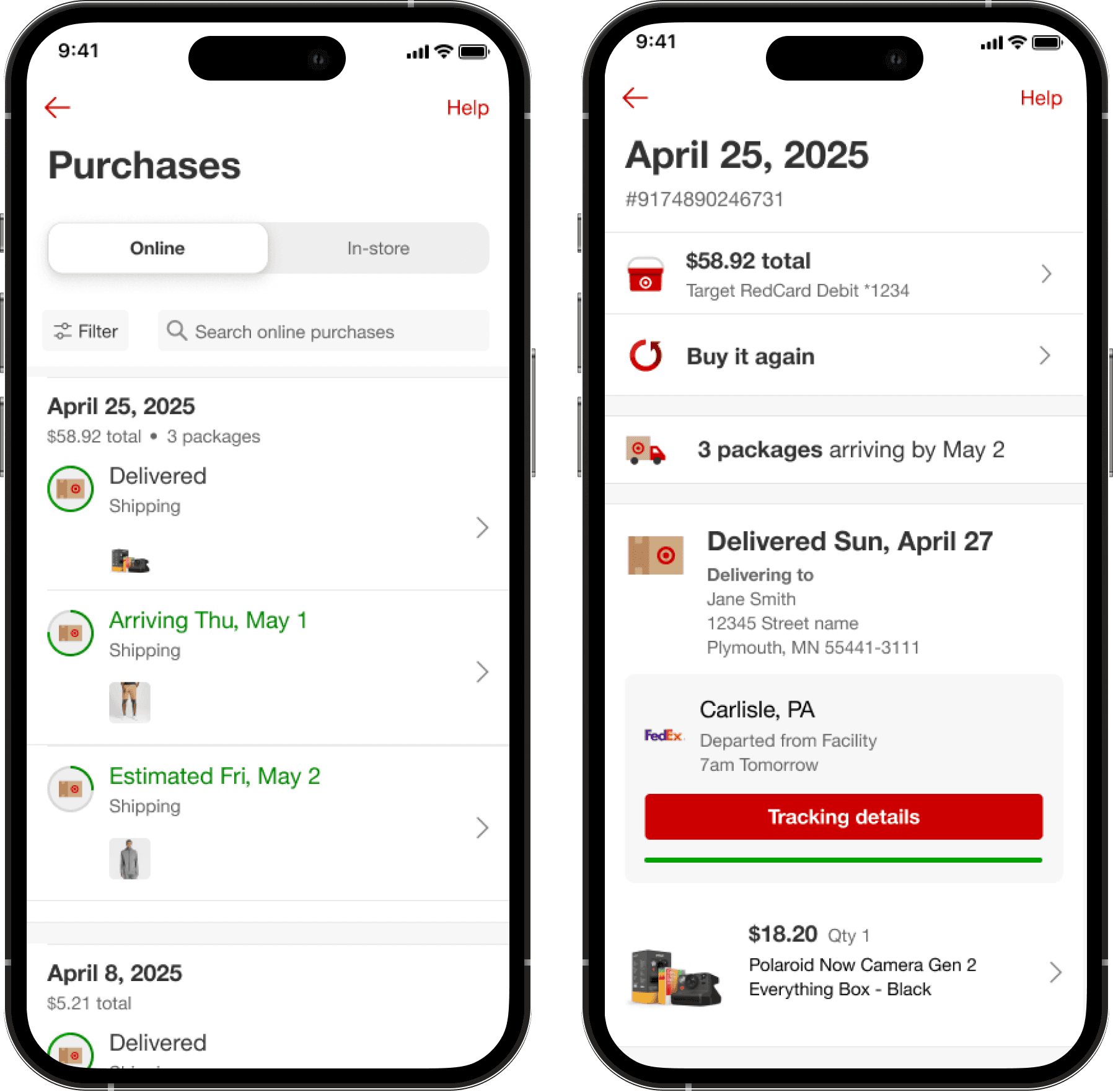
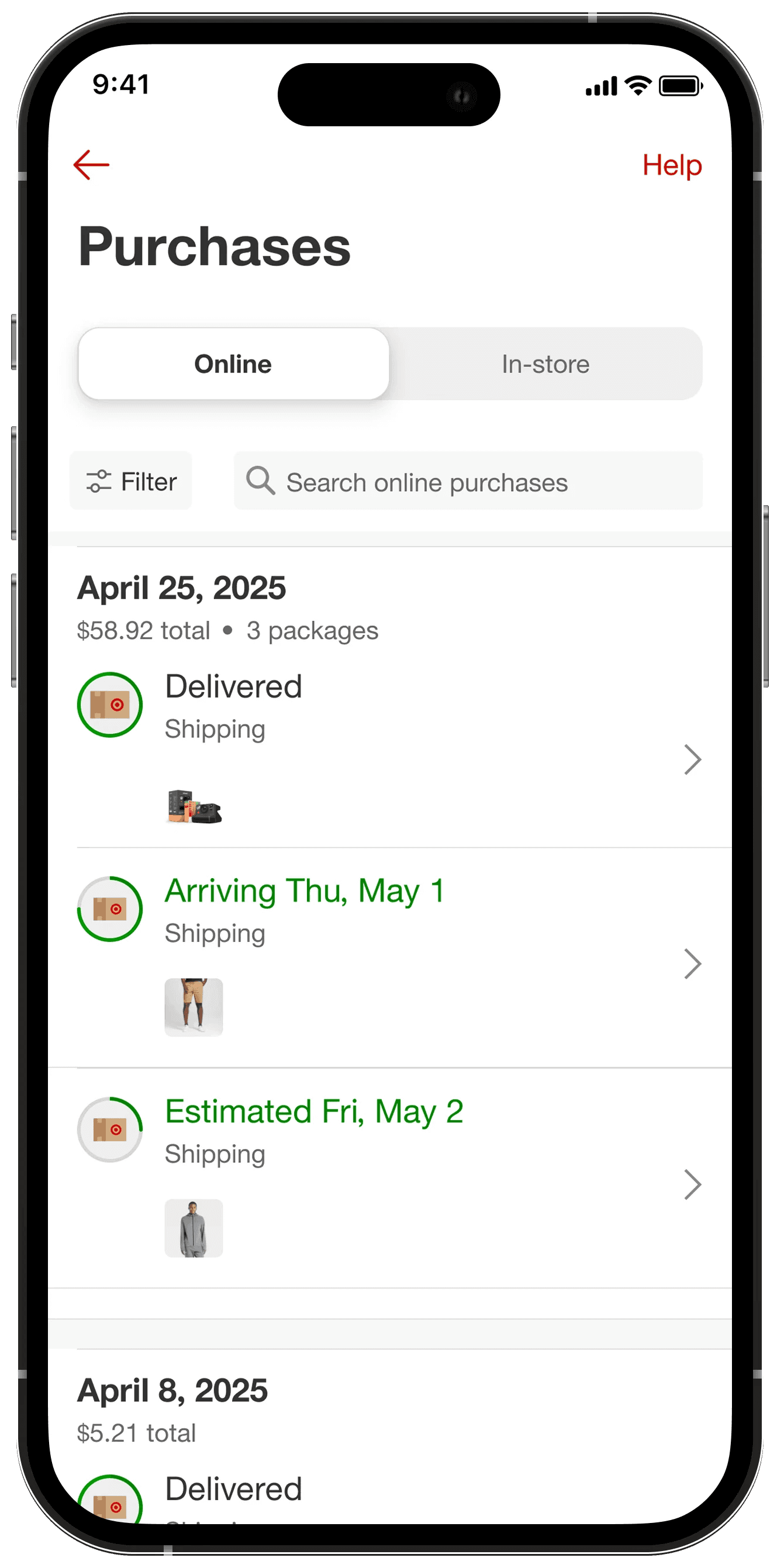
On order history page, the package count would simply be displayed via bullet point.
The order details page would show a package summary, informing the guest by what day all their packages would arrive by.
I conducted unmoderated user testing with 8 participants my prototype using user-testing.com

Testing Results
Testing showed that all eight participants were able to easily identify how many packages their order contained. Seeing the package count near the order summary increased confidence and reduced uncertainty.
However, the order details summary performed poorly.
Five out of eight participants found the phrasing “3 packages arriving by May 2” confusing.
Participants were unsure whether the date applied to all packages or only the final one.
This feedback highlighted that global summaries can introduce ambiguity when detailed, package-level information already exists on the page.
The Good
8/8 participants easily identified how many packages their order contained.
> “It’s very clear that the order will arrive in 3 packages.”
> “Seeing ‘3 packages’ next to the order total makes it easier to understand.”
The Bad
5/8 participants were confused by “3 packages arriving my May 2” phrasing.
> “I’m not sure if the date is for all packages or just the last one.”
> “Would it be clearer if each package had its own date shown instead?”
The Solution
After user testing, I found that having a simpler approach was more clear and a shippable solution since a global summary in order details increased noise rather than add clarity.
To ensure a clear and shippable solution, I moved forward with the simpler approach that focused on:
surfacing the package count in order history via bullet point
relying on individual package tracking for detailed information
This solution shipped and is now live on the website on both desktop and mobile viewports.
Learnings
This project reinforced why my front end engineering experience is vital to my UX journey. My engineering background helped me move quickly, respect system constraints, and design within established patterns. However, the most impactful decisions came from understanding user expectations and cognitive load, not technical possibility alone.
Takeaways: The best solutions aren’t always the most comprehensive ones. Sometimes, the highest-impact design is a small, well-placed cue that aligns with how users already think
Looking Ahead
If I were to continue this work, I would explore improving multi-package communication beyond the app, particularly through email. Today, email notifications already signal that parts of an order are shipping, but they do not clearly reinforce how multi-package orders work. Strengthening this messaging could help set expectations earlier and reduce confusion before a guest even opens the app.
User testing also highlighted ongoing cognitive overload on the order details page. Revisiting the information hierarchy and simplifying this experience could create space for future enhancements while making it easier for guests to find the answers they need.
Together, these next steps focus on meeting guests earlier in their journey and reinforcing clarity across channels—ensuring that multi-package orders feel predictable, intentional, and easy to understand.